The BEST File Manager for Windows
Works with and greatly enhances:
Windows 11, 10
Windows 8, 7, Vista, XP
Servers 2003 and later
Starting at just $50 for home use and $69 for a business license (and a business two-pack for just $99!)
What's New / What's Up
Version 4: the future
Major new tools, significant upgrades to current components and faster folder listings.
- Find and rename problem files: bad paths, illegal characters, Linux & iOS (Mac) characters.
- Check files and folders for compliance with different file systems e.g., NTFS, Fat-16, Fat-32, eFat, CDs, iOS, Linux and custom.
Know if the files are right before you copy. - Delete files no matter their length or how they are named.
- Powerful renaming with RegEx e.g. change 'Romeo Smith' into 'Smith, Romeo' and much more.
- Lightening fast directory listing no matter how large the folder.
- Detailed reports for copy errors.
- Variable text size for views and dialogs.
- and many more improvements and fixes..
See the V4 preview here.
Update May 2017
A May 2017 Microsft security update for Windows 10 conflicted with a major routine in FileBoss resulting in FileBoss not starting on some Windows 10 systems.
Versions V3.101 and later, fix the problem. You can read more about this at the page
Windows Creators Conflict.
Finding Duplicate Files
Duplicates can be found in one folder, multiple folders or paths and even across network drives.
If you are looking for duplicate files in a single folder then display that folder in an Explorer tab and start with Step #2 below.
However if you want to search for duplicates across multiple folders start with Step #1 which is next.
Step #1: Collect files from the folders you want to check
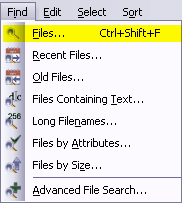 If you want to search across multiple folders or drives, create a Virtual Folder of those folders first and then check for duplicates. Creating a Virtual Folder first makes the process quick, easy to repeat and easy to refine. In addition all of the normal file manipulation routines are available while reviewing the duplicate files.
Start the Find > Files routine
- Select Find > Files by Name... or (Alt+I,F) from the main menu to open the dialog where you can specify exactly which files you want to find.
- If one or more folders are selected in the contents (right-hand) window those folders will be automatically entered into the Paths field of the find dialog.
- If no folders are selected in the contents window then the current folder will be entered into the Paths field.
- Of course you can change the paths at any time.
- FileBoss remembers what has been searched in the past even when it has been closed and then started again so you can always select a previous entry using the drop down list.
Specify what you want to find
Click image for full size view

- Select the drives or paths you want to check. Multiple paths are separated with the semi-colon (;), comma (,) or bar character (|). You can even specify folders to exclude by preceding the name with a minus sign. For complete details right-click over either the Paths or the Patterns field.
- EntEnter one or more file patterns (or full filenames) you want to find. Multiple names and pattersn are separated with the semi-colon (;), comma (,) or bar character (|) (Hint: to quickly enter a bar character with a space on either side use Ctrl+space).
- Click OK to search and create a Virtual Folder of all matching files
You can find out more about using searches to create Virtual Folders here Finding Files by Name. For another way to create Virtual Folders see Creating Dynamic Virtual Folders.
Step #2: Find the duplicate files
First
Having either navigated to the Folder you want to check in Explorer Tab or having created a virtual folder in step #1 then...
Next:
- Select Tools | Find Duplicates in Current Tab... from the main menu to open the Find Duplicate Files command dialog
Finally:
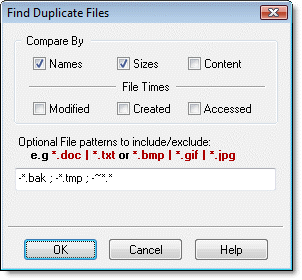 Review the settings
- Check the options FileBoss should use when considering whether two files are duplicates or not.
- Optionally specify the file types that should be included (or excluded) in the search for duplicates.
- Click the OK Button to close the dialog have FileBoss search for duplicate files.
- FileBoss will sort the files, evaluate which are duplicates and which are not, hide all files that are not duplicates and display those that are.
- You can then look at the files and Delete, Recycle or perform any other normal FileBoss Action
Hint: If too many files are displayed you can either perform the operation again redefining what makes a duplicate a duplicate or which files should be included in the evaluation. Or you can select whole groups of files and hide (click the
Hide Selected Files button ) and then examine what is left.

 What do you need to do today?