The BEST File Manager for Windows
Works with and greatly enhances:
Windows 11, 10
Windows 8, 7, Vista, XP
Servers 2003 and later
Starting at just $50 for home use and $69 for a business license (and a business two-pack for just $99!)
What's New / What's Up
Version 4: the future
Major new tools, significant upgrades to current components and faster folder listings.
- Find and rename problem files: bad paths, illegal characters, Linux & iOS (Mac) characters.
- Check files and folders for compliance with different file systems e.g., NTFS, Fat-16, Fat-32, eFat, CDs, iOS, Linux and custom.
Know if the files are right before you copy. - Delete files no matter their length or how they are named.
- Powerful renaming with RegEx e.g. change 'Romeo Smith' into 'Smith, Romeo' and much more.
- Lightening fast directory listing no matter how large the folder.
- Detailed reports for copy errors.
- Variable text size for views and dialogs.
- and many more improvements and fixes..
See the V4 preview here.
Update May 2017
A May 2017 Microsft security update for Windows 10 conflicted with a major routine in FileBoss resulting in FileBoss not starting on some Windows 10 systems.
Versions V3.101 and later, fix the problem. You can read more about this at the page
Windows Creators Conflict.
Clean Folders
with Intelligent Delete
What is Intelligent Delete and Cleaning Folders?
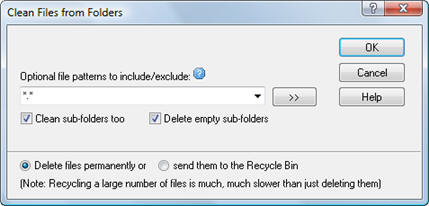 FileBoss's, Intelligent Delete deletes all files (or the files that match the optional file patterns) in a folder and all subfolders.
If it finds files that can't be deleted it still continues to delete all the rest (unlike Windows Explorer and other file managers.)
For example it might be used to remove backup or intermediate files that aren't needed any more.
You can easily specify multiple patterns by separating them with semi-colons or the bar character, e.g. *.bak; *.tmp; ~*.*.
In addition - and as an option - FileBoss can remove any folders that are empty after the cleaning process has completed.
How to Clean Folders
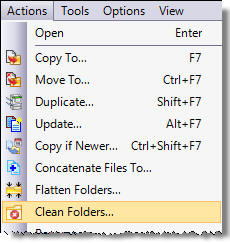 Cleaning folders is a simple process of select, specify a few simple options and the let FileBoss do the work.
- Select the folders you want to clean in the List window (right-hand window) or click on a folder in the navigation window (the left-hand window).
- Use the Actions > Clean Folders... command from the main menu.
- Fill in any optional patterns, select the appropriate options and click OK
Deleting vs. Recycling
The Windows Recycle Bin was not designed for and is not efficient when handling large numbers of files (as in hundreds). If the Recycle option is used when many files will be delete your computer down significantly and take a long time to finish.

 What do you need to do today?