The BEST File Manager for Windows
Works with and greatly enhances:
Windows 11, 10
Windows 8, 7, Vista, XP
Servers 2003 and later
Starting at just $50 for home use and $69 for a business license (and a business two-pack for just $99!)
What's New / What's Up
Version 4: the future
Major new tools, significant upgrades to current components and faster folder listings.
- Find and rename problem files: bad paths, illegal characters, Linux & iOS (Mac) characters.
- Check files and folders for compliance with different file systems e.g., NTFS, Fat-16, Fat-32, eFat, CDs, iOS, Linux and custom.
Know if the files are right before you copy. - Delete files no matter their length or how they are named.
- Powerful renaming with RegEx e.g. change 'Romeo Smith' into 'Smith, Romeo' and much more.
- Lightening fast directory listing no matter how large the folder.
- Detailed reports for copy errors.
- Variable text size for views and dialogs.
- and many more improvements and fixes..
See the V4 preview here.
Update May 2017
A May 2017 Microsft security update for Windows 10 conflicted with a major routine in FileBoss resulting in FileBoss not starting on some Windows 10 systems.
Versions V3.101 and later, fix the problem. You can read more about this at the page
Windows Creators Conflict.
Concatenating Files
 Concatenating files quickly joins a group of files (typically text based files such as log files) together. And with FileBoss you can specify what, if any, line-breaks and other characters should be put before and after each file. In addition you can concatenate files to an existing file or overwrite a file if it already exists.
Quick Start: Concatenating Files
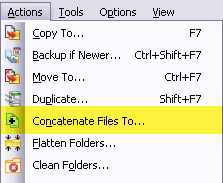
This action is applied to selected files. If no files have been selected the menu command will be unavailable.
- Select the files you want to Concatenate
- Select Actions > Concatenate Files To...from the main menu to open the Backup dialog.
- Fill enter the destination file and select if the it should be appended to if it already exists.
- Select the appropriate options.
- Click the OK button to start.
Click image for a full-size view


 What do you need to do today?