The BEST File Manager for Windows
Works with and greatly enhances:
Windows 11, 10
Windows 8, 7, Vista, XP
Servers 2003 and later
Starting at just $50 for home use and $69 for a business license (and a business two-pack for just $99!)
What's New / What's Up
Version 4: the future
Major new tools, significant upgrades to current components and faster folder listings.
- Find and rename problem files: bad paths, illegal characters, Linux & iOS (Mac) characters.
- Check files and folders for compliance with different file systems e.g., NTFS, Fat-16, Fat-32, eFat, CDs, iOS, Linux and custom.
Know if the files are right before you copy. - Delete files no matter their length or how they are named.
- Powerful renaming with RegEx e.g. change 'Romeo Smith' into 'Smith, Romeo' and much more.
- Lightening fast directory listing no matter how large the folder.
- Detailed reports for copy errors.
- Variable text size for views and dialogs.
- and many more improvements and fixes..
See the V4 preview here.
Update May 2017
A May 2017 Microsft security update for Windows 10 conflicted with a major routine in FileBoss resulting in FileBoss not starting on some Windows 10 systems.
Versions V3.101 and later, fix the problem. You can read more about this at the page
Windows Creators Conflict.
Meta-Variables
Meta-variables are place holders that will be filled in with the data they represent at the time an action is started. For instance the meta-variable <today> with be replaced with the current date (in yyyy-mm-dd) format when it is used in renaming a file or as part of a target path when copying files.
All meta-variables must be enclosed in angle brackets (<>) or percent signs (%).
Meta Folder Names
The following is a list of meta-variables that FileBoss recognizes along with a sample of the output once they have been resolved.
Using meta-variables
All meta-variables must be enclosed in angle brackets, e.g. <today>. They can be used when renaming files both from the major rename dialogs and also inline.
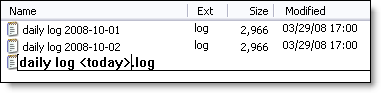
The can also be used as parts of a target path for copy operations:
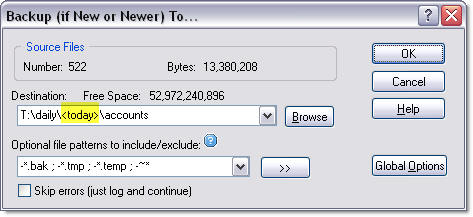
Complete list meta-variables
|
Meta-variable |
Sample Replacement |
|
today (t) |
2008-10-04 |
|
now (n) |
2008-10-04 11-15-10 |
|
currentyear (cy) |
2008 |
|
currentmonth (cm) |
10 |
|
currentday (cd) |
04 |
|
currenthour (ch) |
10 |
|
currentminute (cmin) |
15 |
|
currentsecond (csec) |
23 |
|
user |
Accounts1\Fred |

 What do you need to do today?