The BEST File Manager for Windows
Works with and greatly enhances:
Windows 11, 10
Windows 8, 7, Vista, XP
Servers 2003 and later
Starting at just $50 for home use and $69 for a business license (and a business two-pack for just $99!)
What's New / What's Up
Version 4: the future
Major new tools, significant upgrades to current components and faster folder listings.
- Find and rename problem files: bad paths, illegal characters, Linux & iOS (Mac) characters.
- Check files and folders for compliance with different file systems e.g., NTFS, Fat-16, Fat-32, eFat, CDs, iOS, Linux and custom.
Know if the files are right before you copy. - Delete files no matter their length or how they are named.
- Powerful renaming with RegEx e.g. change 'Romeo Smith' into 'Smith, Romeo' and much more.
- Lightening fast directory listing no matter how large the folder.
- Detailed reports for copy errors.
- Variable text size for views and dialogs.
- and many more improvements and fixes..
See the V4 preview here.
Update May 2017
A May 2017 Microsft security update for Windows 10 conflicted with a major routine in FileBoss resulting in FileBoss not starting on some Windows 10 systems.
Versions V3.101 and later, fix the problem. You can read more about this at the page
Windows Creators Conflict.
Managing External File Viewers
To Add, Change, Edit or Remove External Viewers
Open the External Viewers Setup Panel by:
-
Select Options > Program Options... from the main menu
-
or click the Options button:

-
In the Options dialog select the Viewers Panel.
-
or select Tools | Auto-Viewers On/Off > Setup... from the main menu to display the options page directly
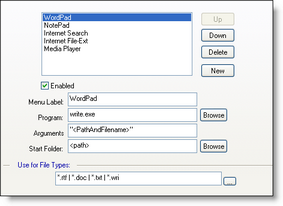
If the program field is empty and the Arguments field contains "<PathAndFilename>" FileBoss will attempt to open the file using the default program for that type of files. This can be useful for standard file types such as MP3 and TXT files.
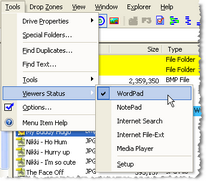
The tools will be then be displayed on the main menu and right-click menus when a file they apply to is highlighted.
Main Menu
(showing that the WordPad tool is active.
Select a viewer to toggle it on and off.)

 What do you need to do today?