The BEST File Manager for Windows
Works with and greatly enhances:
Windows 11, 10
Windows 8, 7, Vista, XP
Servers 2003 and later
Starting at just $50 for home use and $69 for a business license (and a business two-pack for just $99!)
What's New / What's Up
Version 4: the future
Major new tools, significant upgrades to current components and faster folder listings.
- Find and rename problem files: bad paths, illegal characters, Linux & iOS (Mac) characters.
- Check files and folders for compliance with different file systems e.g., NTFS, Fat-16, Fat-32, eFat, CDs, iOS, Linux and custom.
Know if the files are right before you copy. - Delete files no matter their length or how they are named.
- Powerful renaming with RegEx e.g. change 'Romeo Smith' into 'Smith, Romeo' and much more.
- Lightening fast directory listing no matter how large the folder.
- Detailed reports for copy errors.
- Variable text size for views and dialogs.
- and many more improvements and fixes..
See the V4 preview here.
Update May 2017
A May 2017 Microsft security update for Windows 10 conflicted with a major routine in FileBoss resulting in FileBoss not starting on some Windows 10 systems.
Versions V3.101 and later, fix the problem. You can read more about this at the page
Windows Creators Conflict.
FileBoss File Manager
vs
Windows Explorer
Much more than just a great file manager
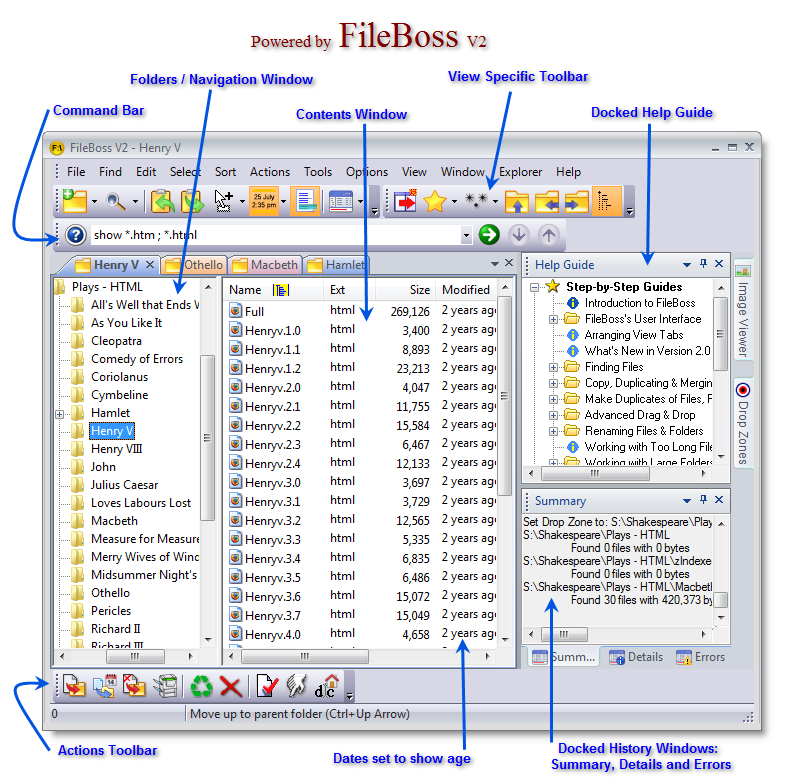 FileBoss is the most modern, robust and powerful file manager on the planet - and our 30-day money back guarantee backs up our boast.
FileBoss's Advanced Copy Engine (FACE) ensures fast, accurate, flexible and easy file copying, moving, duplication, backups and much more.
The rename routines are the easiest and yet most flexible around.
And from cleaning folders to concatenating files FileBoss's extensive toolbox helps you keep you file system and computer running at their peak.
Try FileBoss today an see its power (and its beauty) for yourself. Download it here.
Robust flexible copying
Dedicated general and specialized copy routines
For backing up, updating, only if newer, to multiple targets, with pauses, limiting speed, and more. See
Copy Files
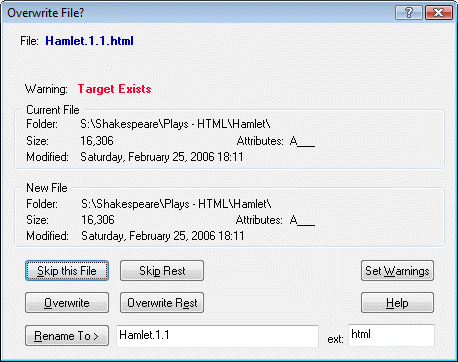
No more aborting a copy just because of a problem with one file. FileBoss detects problems copying a file or overwriting an existing file and will give you the option of correcting the problem (such as closing a file or program in use), renaming, skipping just that file, skipping all remaining files.
Naturally all problems will be logged.
Click for larger view
Enhanced Drag & Drop
FileBoss's powerful copy engine, FACE, is also used when using Drag & Drop to copy files. See Enhanced Drag & Drop
Rename files the way you need them renamed
Rename one file or thousands
of files any way you want.
FileBoss provides a range of options for renaming files
- search and replace text
- change extensions
- sequential numbering
- delete or replace spaces
- set to lower case, upper case or word cap (name, extension or both)
convert to true DOS 3.8 names, and much, much more.
Each file can individually confirmed
(and, of course, changed) or you can tell FileBoss to just to do it all without asking again.
See
Rename Files & Folders for more.
Find the files you need
Dedicated Advanced, Search Routines
Whether you need to find a file that you used yesterday or want to find all the files you haven't touched in over six months FileBoss has a way to do it.
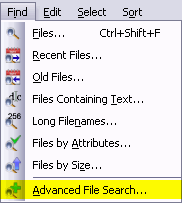
See
Finding Files for more
More efficient exploring
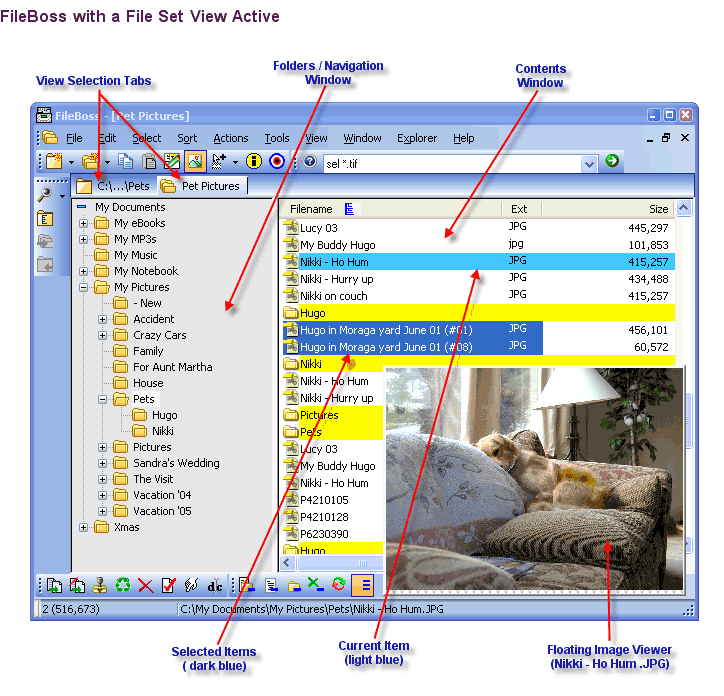
Multiple Tabs
No need to shift one window back and forth between folders.
The number of Explore Views or Virtual Folders that can be open is limited only by the memory available - in other words the number is limitless for all practical purposes.
Screen shot
Multiple Tab Groups (Dual Pane+++)
Tabs can be grouped into panes so that you can see more than one tab at a time. Tab groups can contain multiple tabs and be arranged either vertically or horizontally.
Bookmarks
FileBoss will remember even when you don't. Quickly mark any folder, local or on a network, for quick reference in the future. Bookmarks can be used to quickly display a folder in a new Explore View or to open a new Explore View to show (we did mention that many views can be open at the same time).
More...
Sticky Selections
Selecting files the way it should have been in the first place..
Click one entry it is selected. Click another entry and it too is selected. Highlight a range of entries and they are added to the selected files. Select files by file patterns (e.g. *.bmp | *.jpeg ) and they will be added.> And combined with various select (and deselect commands) selecting files - even thousands of files - is easy. This is Sticky Select mode where selections are additive.
And, of course, sticky selection mode is easy to turn on and off should you wish to select files the old way.
Want more? No problem. Even with many files and folders selected you can still rename, delete, recycle or open just one file without affecting the selected files.
Want to know more? Click
here...
Persistency
FileBoss will remember where you were, even in multiple Views.
All open Explore Views and Virtual Folders will be automatically saved when FileBoss is closed and restored when FileBoss is started again.
Naturally you can specify what types of Views, if any, will be automatically reopened.
You can also save the state of all open views by name and reopen them again as a group at any time.
And FileBoss can be set to restart with Windows
1,000s of Files at Once
What Explorer can't even do with one file, FileBoss can do with 1,000s.
Courtesy of Virtual Folder Views FileBoss can sort, display and manipulate (copy, rename, delete) thousands of files in multiple folders across multiple drives and even across networks all at a time quickly and easily.
Logging
No more wondering if you really did what you think you did!
Action results (e.g. files copied, renamed, deleted, etc) are written to three log windows: Summary, Details and Errors. These entries are kept even if the Results window is closed so that they can be seen after the fact simply by opening the Results window.
In addition the Results can be written to disk files of your choosing.
Screen shot

 What do you need to do today?