The BEST File Manager for Windows
Works with and greatly enhances:
Windows 11, 10
Windows 8, 7, Vista, XP
Servers 2003 and later
Starting at just $50 for home use and $69 for a business license (and a business two-pack for just $99!)
What's New / What's Up
Version 4: the future
Major new tools, significant upgrades to current components and faster folder listings.
- Find and rename problem files: bad paths, illegal characters, Linux & iOS (Mac) characters.
- Check files and folders for compliance with different file systems e.g., NTFS, Fat-16, Fat-32, eFat, CDs, iOS, Linux and custom.
Know if the files are right before you copy. - Delete files no matter their length or how they are named.
- Powerful renaming with RegEx e.g. change 'Romeo Smith' into 'Smith, Romeo' and much more.
- Lightening fast directory listing no matter how large the folder.
- Detailed reports for copy errors.
- Variable text size for views and dialogs.
- and many more improvements and fixes..
See the V4 preview here.
Update May 2017
A May 2017 Microsft security update for Windows 10 conflicted with a major routine in FileBoss resulting in FileBoss not starting on some Windows 10 systems.
Versions V3.101 and later, fix the problem. You can read more about this at the page
Windows Creators Conflict.
Auto-completion of Paths
FileBoss will now auto complete filenames in most dialogs and on the command bar when the full path is given and is the first thing to be typed in the field.
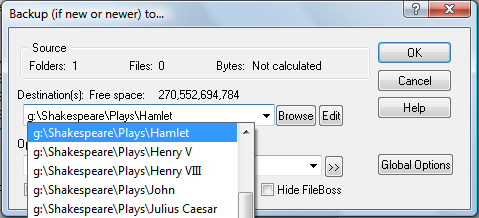
Completing pathnames in dialogs
In most places that require a path to a folder or file, such as the source or destination of a copy operation, FileBoss will auto-complete a path as you type it in along with providing a list of folders and files that match what has already been typed in. Note that auto-complete is only available for the first path in the field. If more than one path can be entered the Browse or Edit buttons can help enter multiple paths. For more on multiple paths see Entering Multiple Paths.
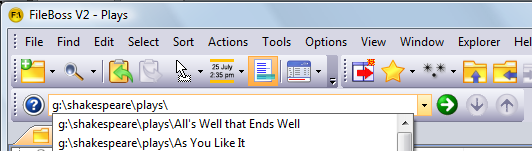
Completing paths in the command bar
The command bar can be used to go directly to a folder or file by either pasting or typing the full path into it. When a path is the first thing entered in the command bar FileBoss will auto-complete the path as you type it in along with providing a list of folders and files that match what has already been typed in. Note that auto-complete is only available when a path is entered as the first thing on the command bar.
For more on the command bar and all it can do for you see Using the Command Bar,

 What do you need to do today?